You can embed a Google Map into your page without having to install a separate module. This is done using the Full HTML capabilities of the Text Editor and pasting the iframe code right into your Body field.
Obtain the Google Map’s Source Code
- Search Google Maps for address.

- Click Share and Embedded Map to get the embed code.
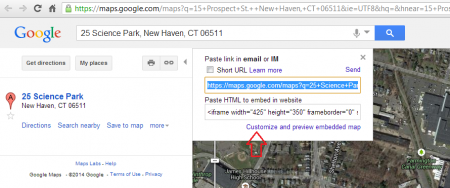
- Copy HTML code to embed into Drupal Page.
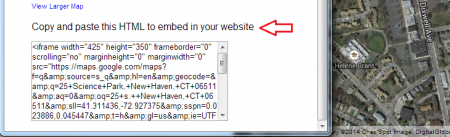
Adding Google Map Source Code to your page.
- Once you have selected the page for the map click Edit.

- In the Text Format select Full HTML. Alternatively, select the source button.

- Paste the code into the body area.
- Click on the Save button.

You should now have a Google Map in your content area pointing out your location as well as give people the opportunity to get Directions and more.