Field as Block
Module Type:
Supported
Field as Block allows you to take a simple Field and display it as a Block on the current page. This block can eliminate the need to use other complex Modules such as Views, Panels or Display Suite by providing an easy way to display related information in the desired Regions of the page.
Configuring the Field to Display as a Block
- Enable the Module - Modules > Field as Block
- Select and open the Content Type with the Field you want to display as a Block - Structure > Content Types > [Content Type Name]
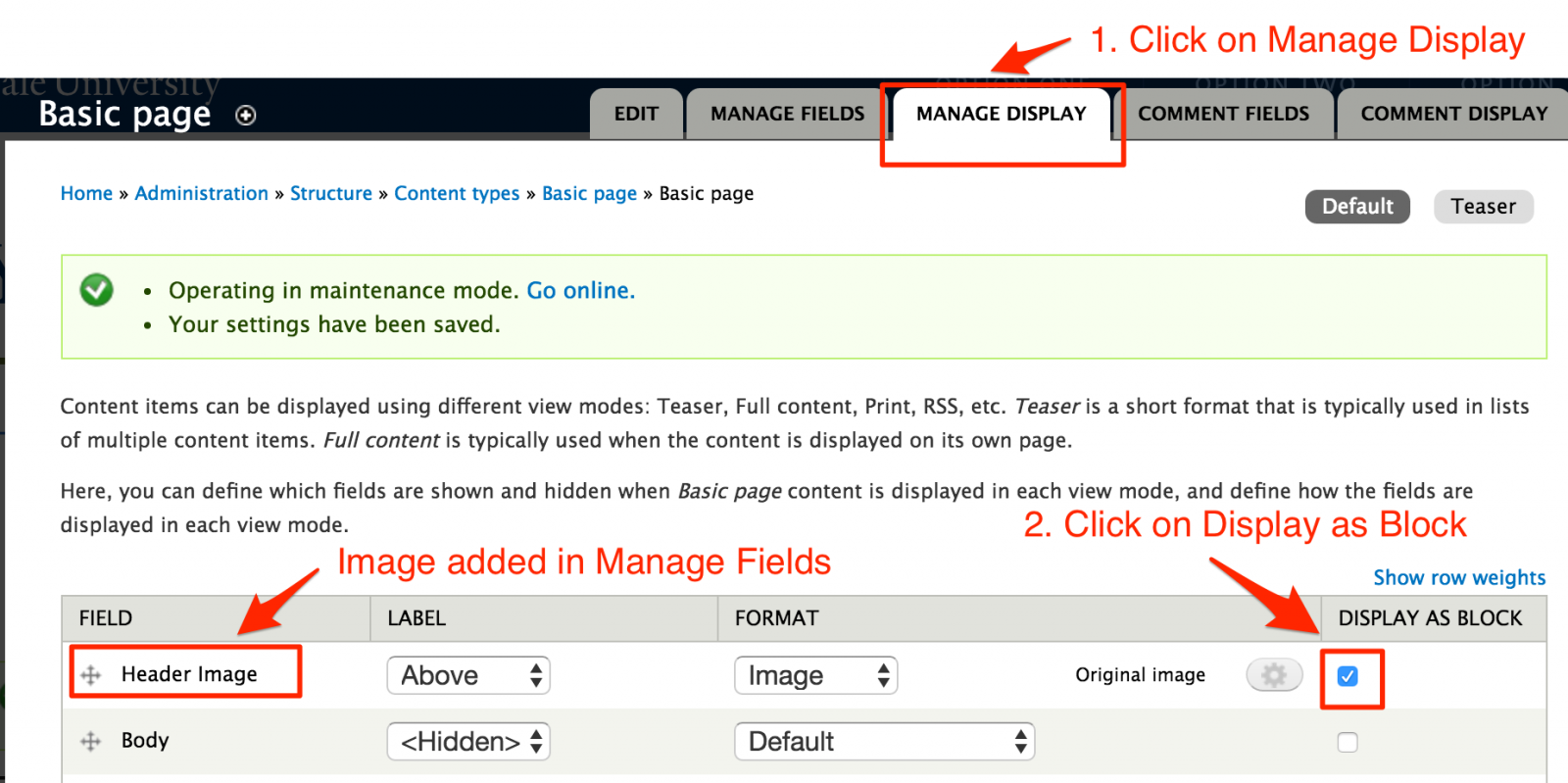
- Click on Manage Display and locate the field.
- Click on the Display as Block check box for each field you want to display as a Block.
Assigning the Block to Display in a Region
Create a page and add the Fields. You will notice that when you Save the page, the Fields don’t display. That is because they are now Blocks and they need to be assigned to the appropriate Regions.
- Go to the Blocks Listing page - Structure > Blocks.
- Scroll down to the Disabled section and locate the field.
- Assign the Field to the Region.
 Important Note: You DO NOT need to assign this to specific pages. The Module is built to know what page the Block displays based on the content added to the page.